RTX 5060 Ti 16 GB for Local AI: Measured LLM, Image and Speech Speeds
RTX 5060 Ti 16 GB tested for local AI: five LLMs from 42 to 116 tok/s, first-token times at 32K, image, video, 3D and speech speeds, and what to run on it.
This article is published in English.
The 16 GB RTX 5060 Ti is the card a lot of home AI builds start with: enough video memory for a 27B-class language model, a price that fits a normal desktop budget. That raises the obvious question: how fast is it once you actually load something useful? Below are measured numbers for five language model setups, two image models, a video model, a 3D model and a speech model on one card, plus what changes when you add a second 5060 Ti or move up to an RTX 5090.
Every language model run uses the same harness: 512-token answers to a code prompt and a prose prompt, a warm-up first, the median of repeated runs, thinking off. Prompt processing is measured at 2K, 8K and 32K tokens, and the context test pushes each setup until it no longer fits.
Five models that fit in 16 GB
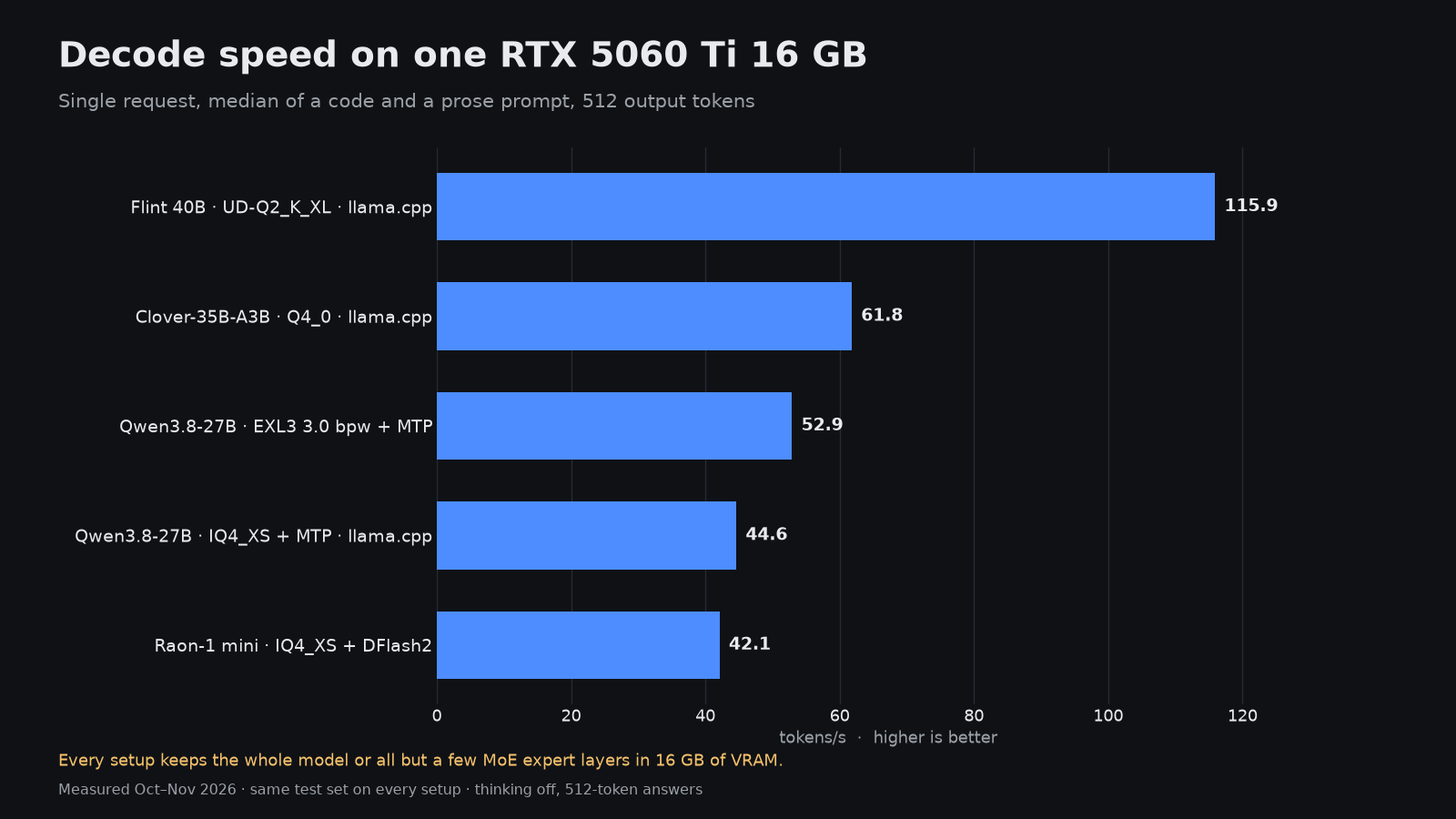
| Model and quant | Engine | Decode, tok/s | Prefill 8K, tok/s | First token at 32K | Largest context | Peak VRAM |
|---|---|---|---|---|---|---|
| Flint 40B UD-Q2_K_XL | llama.cpp | 115.9 | 2,364 | 15.6 s | 64K | 14.7 GiB |
| Clover-35B-A3B Preview Q4_0 | llama.cpp, 20 layers of experts in RAM | 61.8 | 992 | 37.4 s | 128K | 14.8 GiB |
| Qwen3.8-27B EXL3 3.0 bpw | ExLlamaV3 with MTP | 52.9 | 1,027 | 35.7 s | 117,760 | 15.2 GiB |
| Qwen3.8-27B ByteShape IQ4_XS | llama.cpp with MTP | 44.6 | 998 | 36.8 s | 43,008 | 15.4 GiB |
| Raon-1 mini preview IQ4_XS | llama.cpp, 9 layers of experts in RAM | 42.1 | 586 | 61.6 s | 16K | 12.9 GiB |
The spread is almost 3× from top to bottom, and the ranking by raw speed is not the ranking you want for daily use. Only the Qwen3.8-27B EXL3 build has a full quality score on this card (66.1 % averaged over seven tests). The others were measured for speed and context but not ranked yet.
Flint 40B is fast because it is squeezed hard
Flint 40B posts 115.9 tok/s, with code and prose prompts within 0.2 tok/s of each other. It gets there with a 2-bit Unsloth quant (UD-Q2_K_XL) that keeps the whole model in VRAM at 14.7 GiB, which leaves room for a 64K context and nothing more. On the 5090, the NVFP4 build of the same model scored 38.6 % on the quality tests, the lowest of any complete run on that card. Treat Flint as a fast drafting and chat model, not as the one you trust with code review.
Qwen3.8-27B is the balanced pick
The Qwen3.8-27B EXL3 3.0 bpw build from the one-click ExLlamaV3 kit decodes at 52.9 tok/s (53.6 on code, 52.1 on prose) and still fits 117,760 tokens of context at 15.2 GiB. That is the strongest combination of speed, context and measured quality on a 16 GB card in this set.
The ByteShape IQ4_XS GGUF of the same model is a useful contrast. It keeps more bits per weight (3.84 bpw), so it should lose less to quantization, but it decodes at 44.6 tok/s, its MTP drafts are accepted 49.3 % of the time, and the context ceiling drops to 43,008 tokens at 15.4 GiB. If you mostly work with long files or agent sessions, the extra context of the EXL3 build matters more than the extra bits.
How long the first token takes
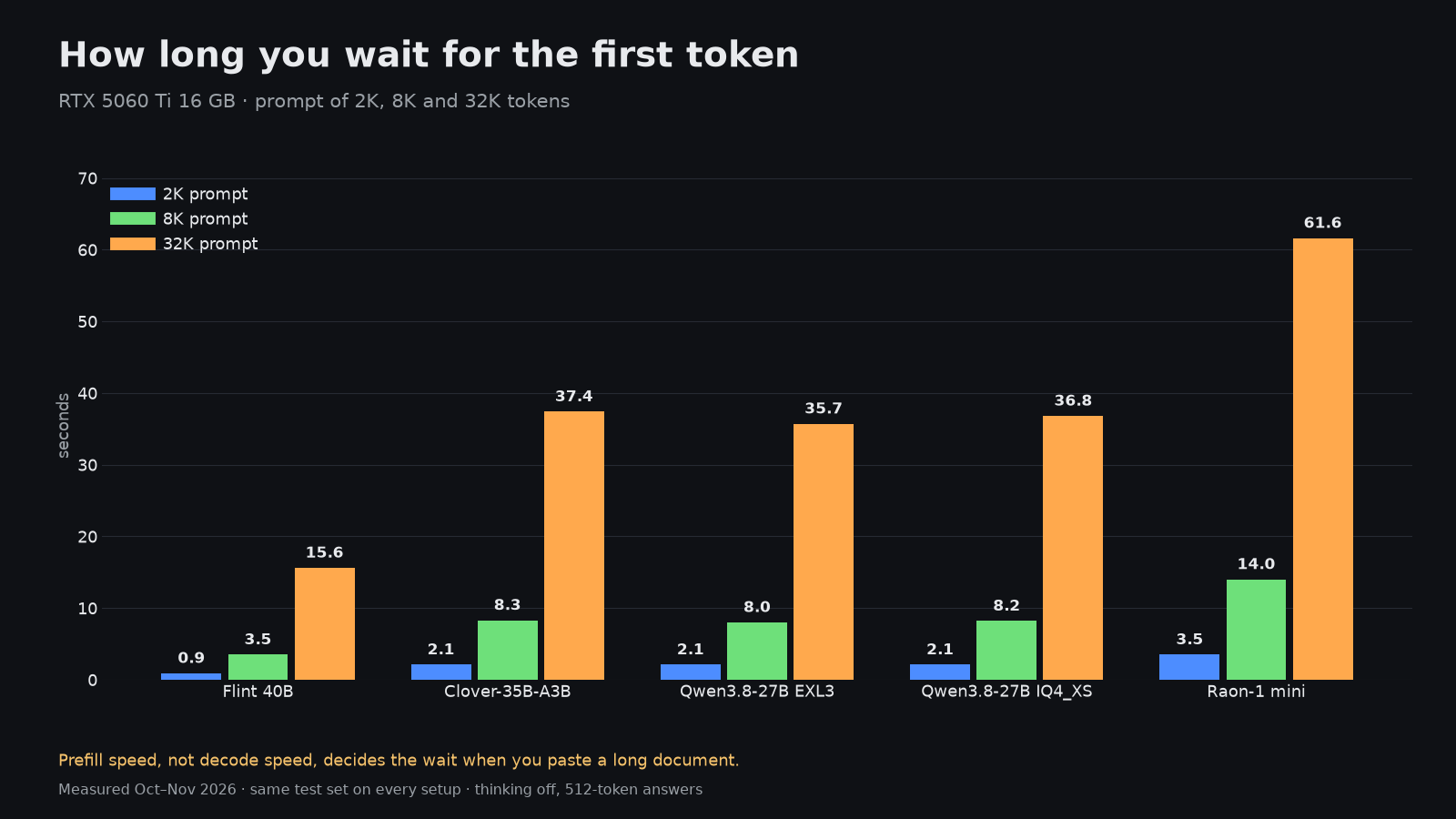
Decode speed is what benchmarks headline, but on a 16 GB card the wait before the answer starts is often the bigger problem. A 32K-token prompt, roughly a medium codebase file set, takes 15.6 s on Flint, 35.7 s on Qwen3.8-27B and 61.6 s on Raon-1 mini. Prefill on this card runs at about 1,027 tok/s for a dense 27B model, so every extra 10K tokens of context costs you around ten seconds before the first word.
If your workload is chat with short prompts, decode speed is the number to watch. If it is RAG, coding agents or long documents, compare prefill and first-token time first.
MoE models with experts in system RAM
Mixture-of-experts models are the main way to run something larger than 16 GB would normally allow. llama.cpp can keep the expert weights of the first layers in system RAM with --n-cpu-moe, and the GPU handles the rest. Clover-35B-A3B Preview at Q4_0 with 20 layers of experts in RAM runs at 61.8 tok/s, reaches a 128K context and peaks at 14.8 GiB of VRAM on a box with 32 GB of system RAM. It also scales with parallel requests: total throughput rises from 46.1 tok/s for one request to 72.3 tok/s for four.
Raon-1 mini preview shows the cost of the same trick when it goes too far. With 9 layers of experts in RAM it decodes at 42.1 tok/s, accepts only 17.7 % of its DFlash2 drafts, tops out at a 16K context and averages 45.1 % on the quality tests. Offloading works, but it is a trade, not free capacity.
One card, two cards or an RTX 5090
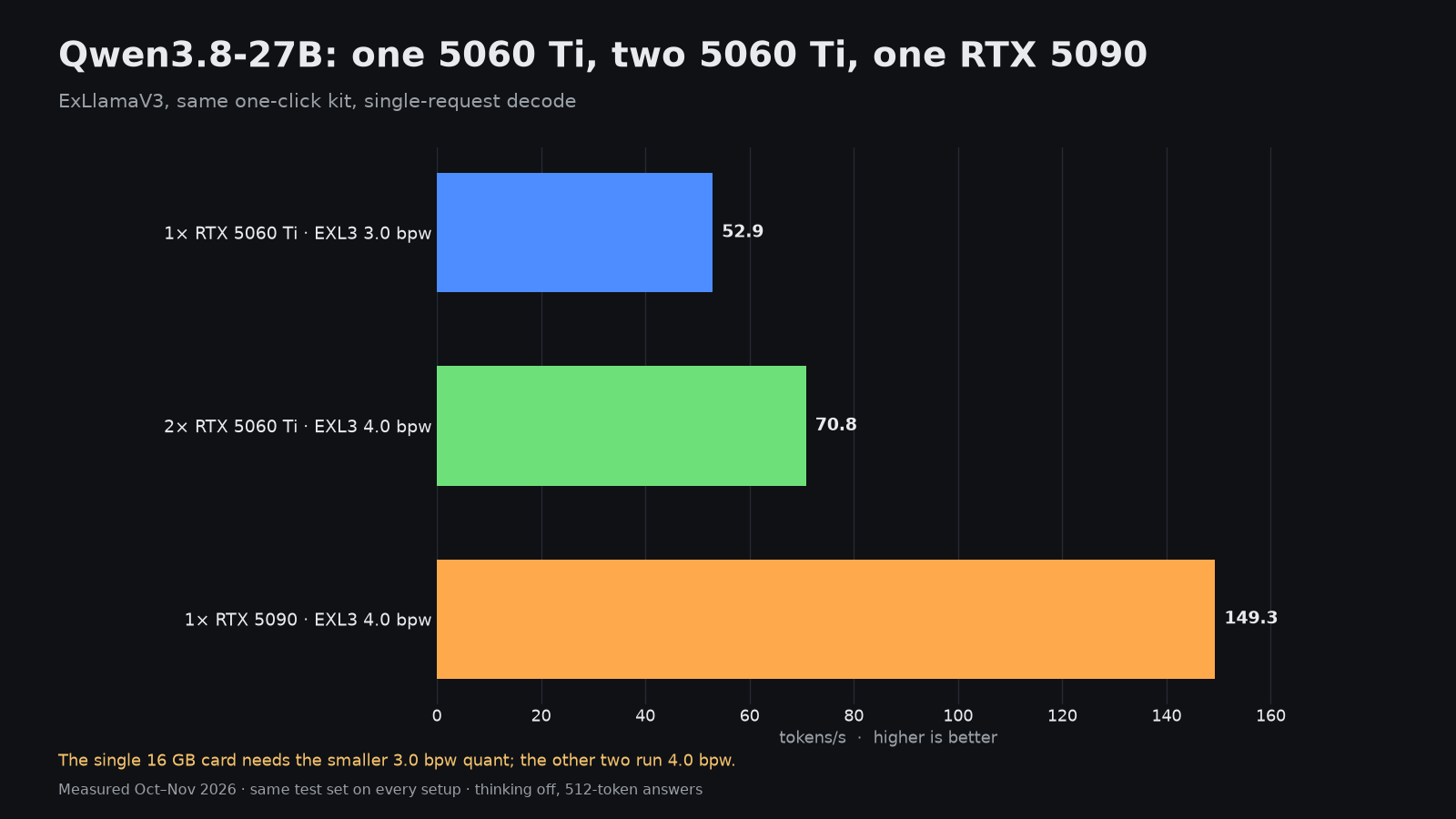
A second 5060 Ti with tensor parallelism lifts Qwen3.8-27B to 70.8 tok/s and, more importantly, lets you move up to the 4.0 bpw EXL3 quant with a 256K context at 22.4 GiB across both cards. Its quality average rises to 67.2 %. That is a real upgrade, but it is about 34 % faster, not twice as fast.
The RTX 5090 runs the same 4.0 bpw build at 149.3 tok/s, roughly 2.8× the single 5060 Ti and 2.1× the pair. Prefill at 8K goes from 1,027 to 3,484 tok/s. If speed is the goal, one bigger card beats two small ones; if you already own one 5060 Ti, the second card buys you context and a better quant.
Images, video, 3D and speech on the same card
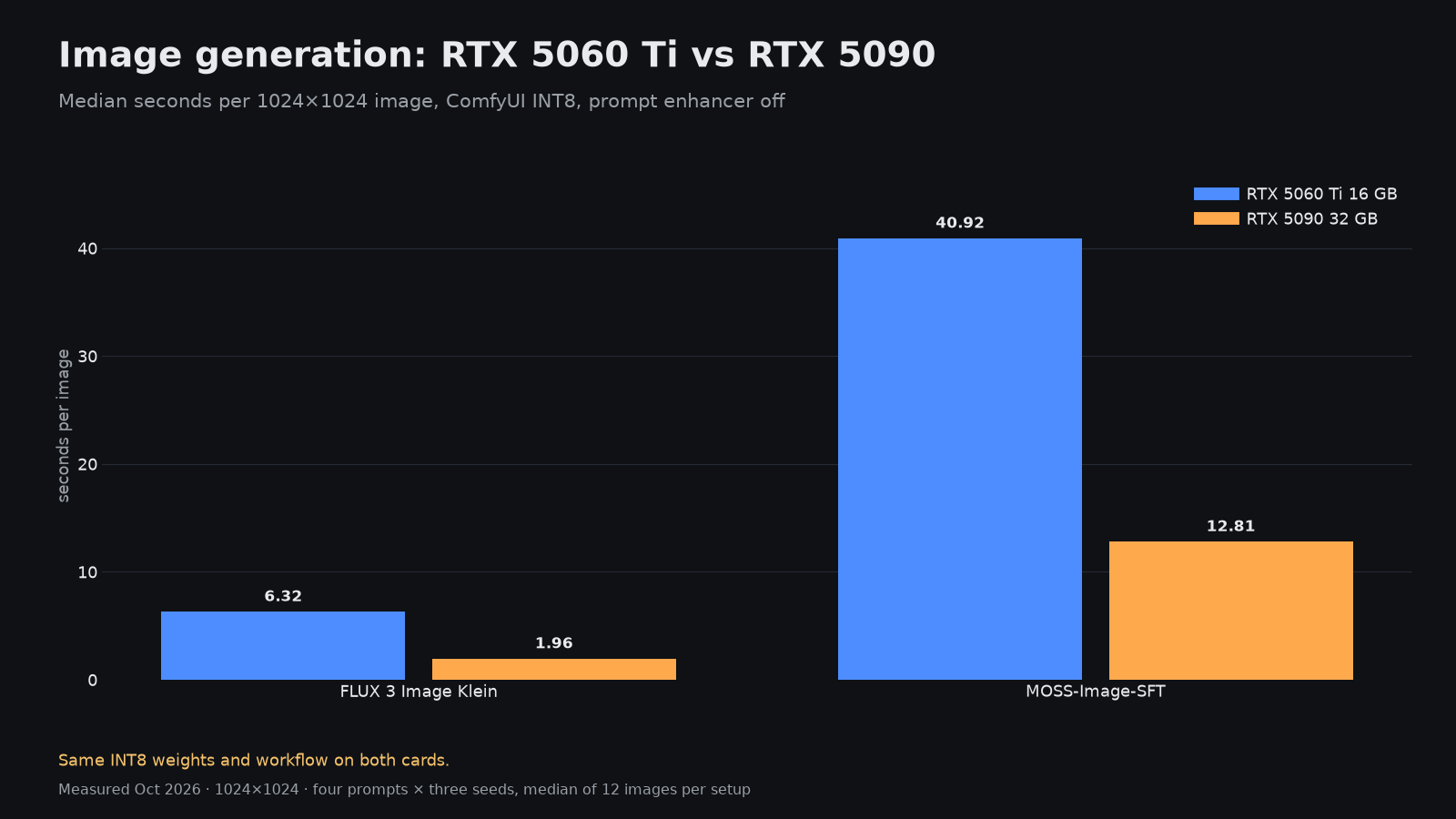
| Task | RTX 5060 Ti 16 GB | RTX 5090 32 GB |
|---|---|---|
| FLUX Klein image | 6.32 s | 1.96 s |
| MOSS image | 40.92 s | 12.81 s |
| Idol 3D model, one picture to mesh | 57.4 s | 14.5 s |
| HyperFlow H3 Flash, 5-second clip with sound, GGUF Q4_K_M | 562.2 s | 107.1 s |
Images and 3D are entirely usable on 16 GB: a FLUX Klein image in about six seconds is fine for iteration. Video is where the card runs out of breath. One 5-second HyperFlow H3 Flash clip at 1344×768 takes 562.2 s, a little over nine minutes, against 107.1 s on the 5090 with the same Q4_K_M file and 86.8 s with the INT8 build that needs the bigger card.
Speech recognition is the surprise. Nemotron 3.5 Transcribe works through 59 minutes 39 seconds of LibriSpeech test-clean audio in 120 seconds on the 5060 Ti, 29.8× real time, with a 1.54 % word error rate. For transcription, 16 GB is more than enough.
What to buy and what to run
- For a single 16 GB card, start with Qwen3.8-27B EXL3 3.0 bpw in ExLlamaV3: 52.9 tok/s, about 115K context, scored quality.
- Use Flint 40B for fast chat and drafting at 115.9 tok/s, and keep a stronger model for anything you need to be right.
- Try Clover-35B-A3B with experts in RAM when you need 128K context and have at least 32 GB of system RAM.
- Plan for slow first tokens on long prompts. Keep RAG chunks and agent context lean on this card.
- Images, 3D and transcription are comfortable. Video generation works, but at roughly nine minutes per 5-second clip it is a batch job.
- If you are choosing hardware today and speed matters, an RTX 5090 is the larger step up than a second 5060 Ti.
How the numbers were taken
All 16 GB runs use one RTX 5060 Ti 16 GB under Linux; the documented host is a Core i7-12700K with 32 GB of RAM. Language model speed is the median of repeated 512-token answers after a warm-up, prefill is measured on fixed 2K, 8K and 32K prompts, and the context limit is the largest prompt that loads and answers. Quality is the mean of seven tests run identically on every scored setup. Image and video times are warm medians from request to finished file.