RTX 5090 Local LLM Benchmarks: Same Qwen3.8-27B, 67 to 253 Tokens per Second
Qwen3.8-27B on one RTX 5090 across TensorFold, NInfer, ExLlamaV3, Qwentin and vLLM: decode, prefill, parallel throughput, quality and which stack to run.
This article is published in English.
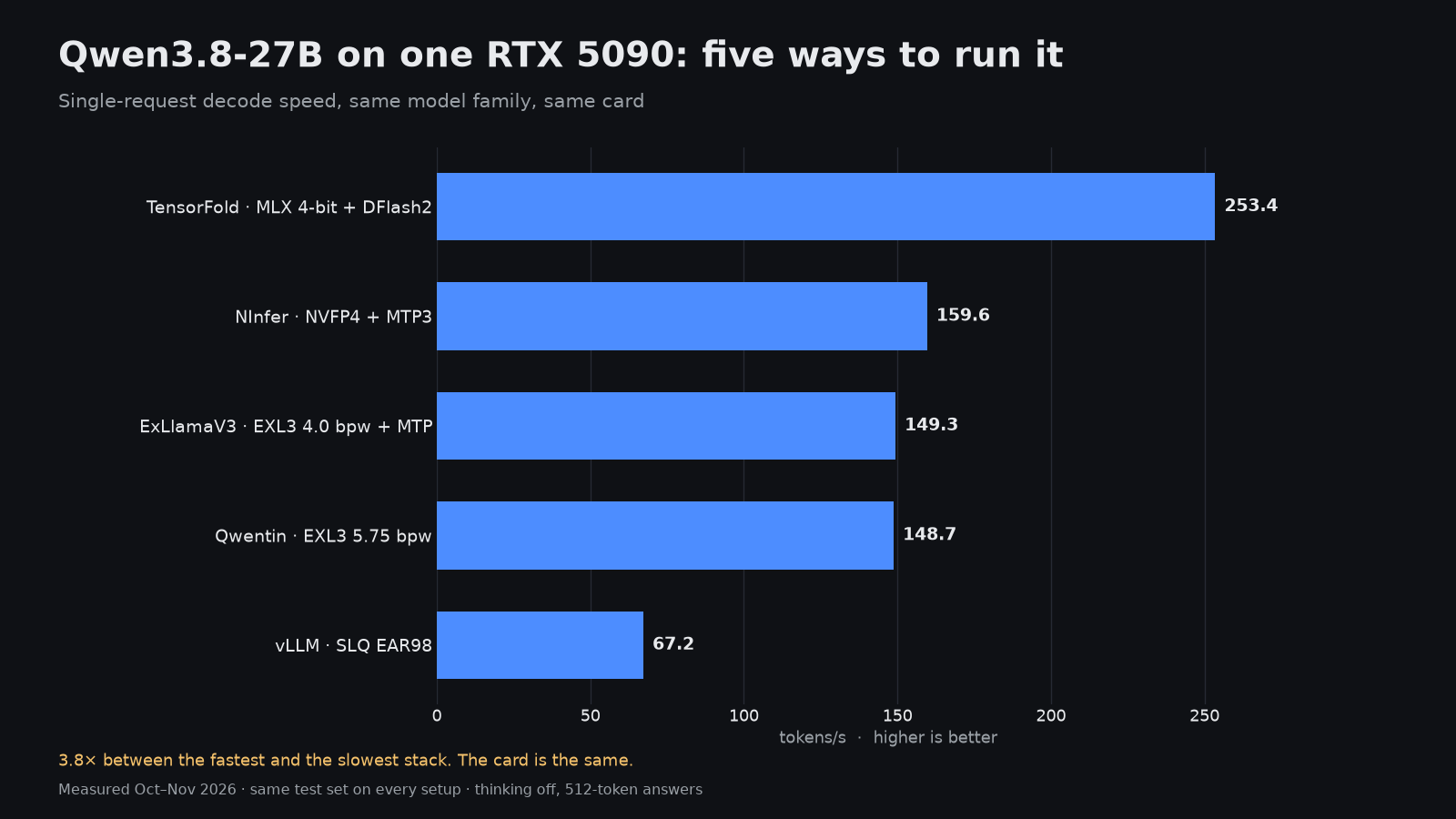
Put the same Qwen3.8-27B on the same RTX 5090 and you can get anything from 67.2 to 253.4 tokens per second. The difference is the engine, the quantization and the speculative decoding method around it. Five complete setups below were measured with an identical harness and quality suite, so the comparison isolates the software stack rather than the hardware.
The card is a single RTX 5090 32 GB. Decode is the median of 512-token answers on a code prompt and a prose prompt; prefill and first-token time are measured at 2K, 8K and 32K tokens; parallel throughput is total tokens per second across 1, 2, 4 and 8 simultaneous requests.
Five stacks for one model
| Engine | Quant | Decode, tok/s | Code / prose | Prefill 8K, tok/s | First token at 32K | Quality mean | Largest context | Peak VRAM |
|---|---|---|---|---|---|---|---|---|
| TensorFold + DFlash2 | MLX 4-bit | 253.4 | 268.2 / 238.7 | 5,033 | 7.7 s | 62.9 % | 256K | 27.3 GiB |
| NInfer + MTP3 | NVFP4 | 159.6 | 169.0 / 150.1 | 10,628 | 3.6 s | 65.3 % | 240,000 | 28.9 GiB |
| ExLlamaV3 + MTP | EXL3 4.0 bpw | 149.3 | 154.5 / 144.2 | 3,484 | 10.5 s | 67.6 % | 128K | 18.9 GiB |
| Qwentin + MTP | EXL3 5.75 bpw | 148.7 | 158.3 / 139.2 | 2,569 | 13.7 s | 67.9 % | 128K | 29.7 GiB |
| vLLM, no speculation | SLQ EAR98 | 67.2 | 67.2 / 67.1 | 3,803 | 9.5 s | 64.3 % | 74,752 | 29.5 GiB |
Speculative decoding explains most of the gap
vLLM runs this model without speculation and lands at 67.2 tok/s, with code and prose within 0.1 tok/s. That is roughly what the card does when every token goes through the full model. The other four stacks all draft tokens ahead and verify them in one pass, and that is where the 2× to 4× comes from.
The methods differ. NInfer uses MTP3 heads with an extra lm-head draft and gets 52.8 % of drafts accepted. TensorFold uses a separate DFlash2 drafter; only 20.0 % of its drafts are accepted, but each verification pass is cheap enough that it still wins single-stream decode by a wide margin. Code prompts are faster than prose on every speculative stack (268.2 vs 238.7 tok/s on TensorFold), because code is more predictable and drafts hit more often.
Prefill tells a different story
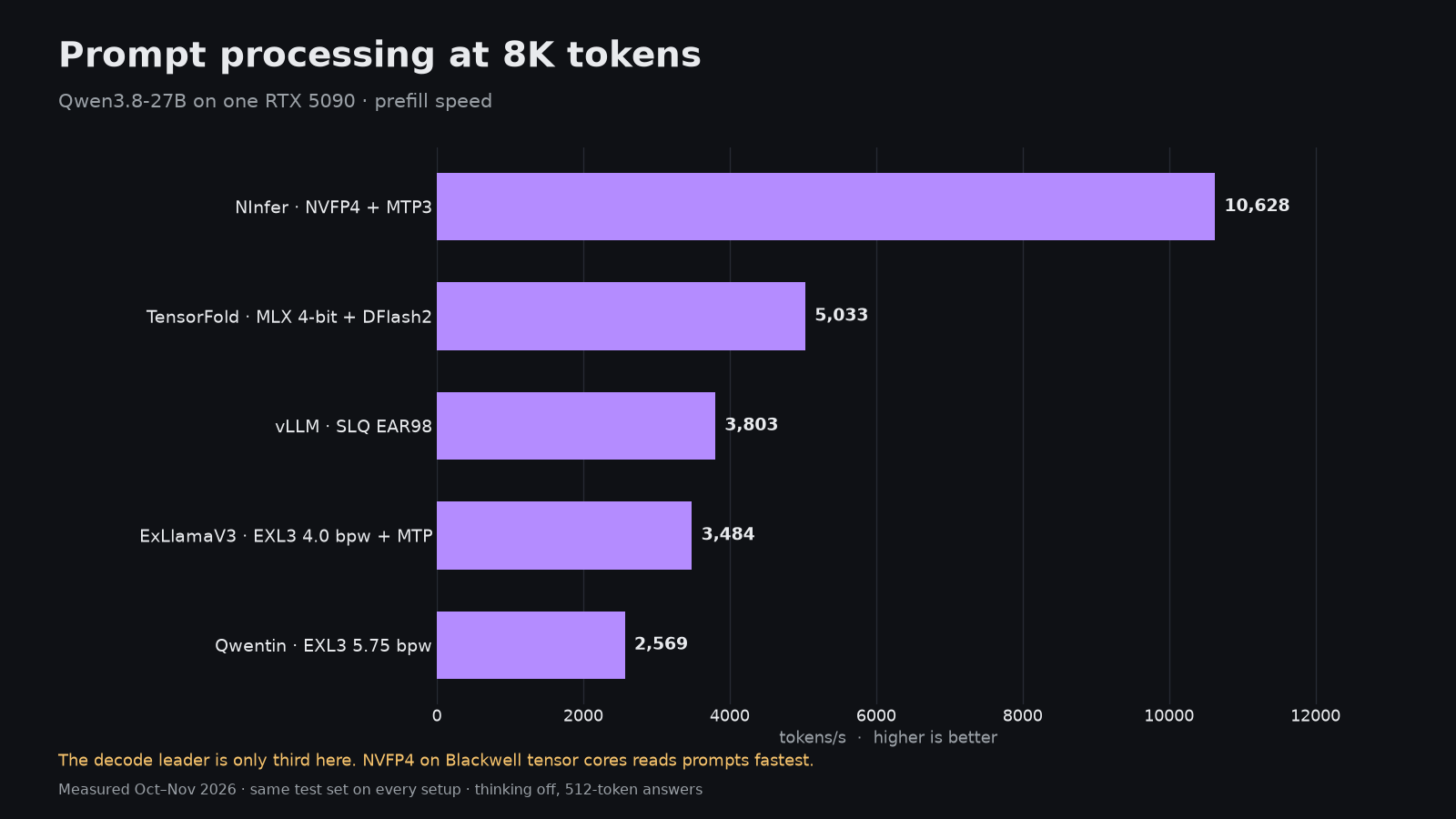
Sort by prompt processing and the order flips. NInfer with NVFP4 reads an 8K prompt at 10,628 tok/s and returns the first token of a 32K prompt in 3.6 s. TensorFold is second at 5,033 tok/s, then vLLM at 3,803, ExLlamaV3 at 3,484 and Qwentin at 2,569. For coding agents that resend large contexts, NInfer saves several seconds per turn over everything else here.
Serving more than one user
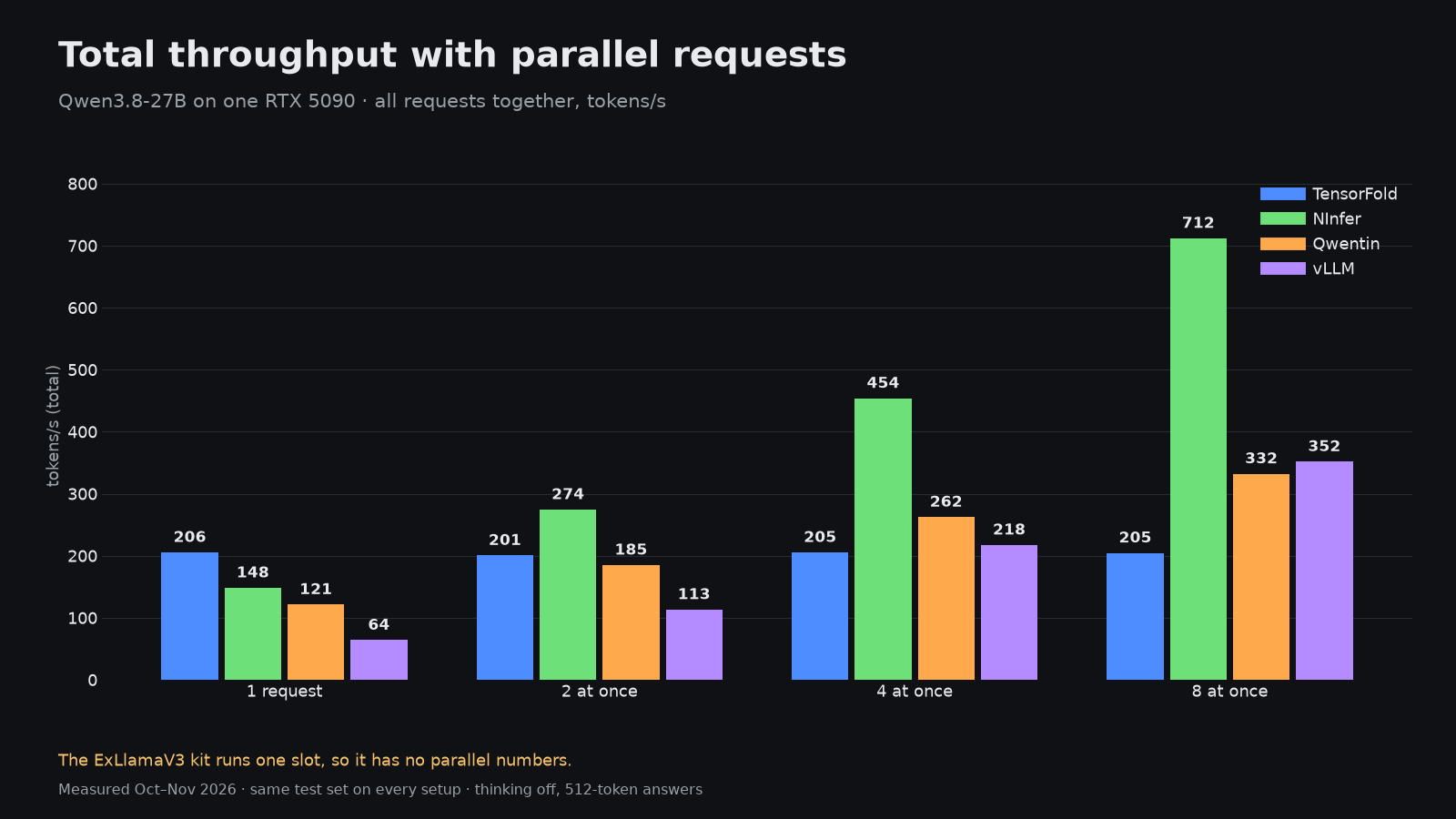
With eight simultaneous requests NInfer delivers 711.9 tok/s in total, vLLM 351.8 and Qwentin 332.2. TensorFold stays at about 204.6 tok/s however many requests arrive, and the ExLlamaV3 kit serves a single slot. If the box serves a team, a few agents or an evaluation loop, NInfer is the clear choice; if it serves one person, TensorFold is.
Does the fast stack answer worse?
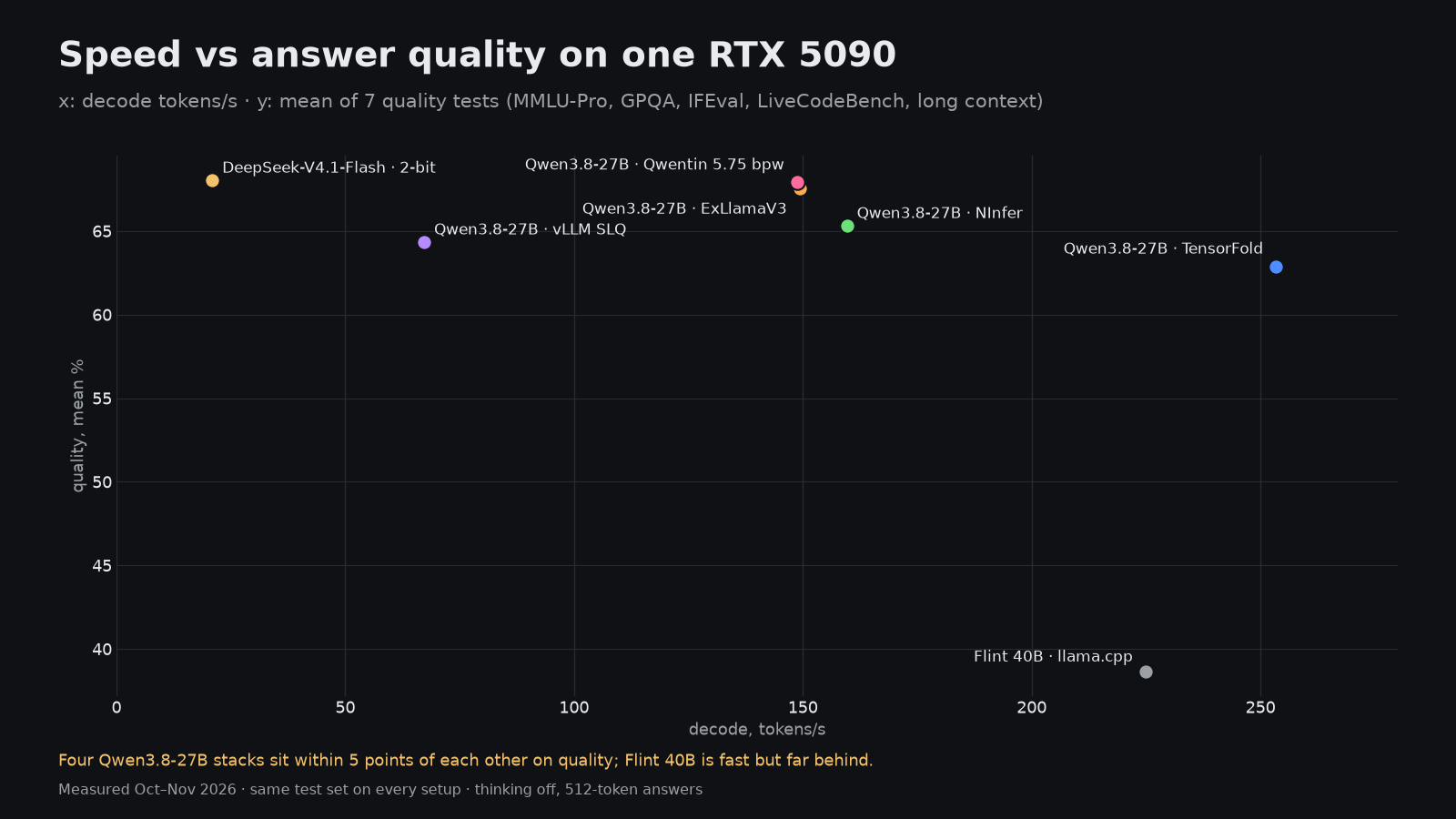
A little, and it tracks the quant more than the engine. The 5.75 bpw Qwentin build scores highest at 67.9 %, ExLlamaV3 at 4.0 bpw follows at 67.6 %, NInfer NVFP4 sits at 65.3 %, vLLM SLQ at 64.3 % and TensorFold MLX 4-bit at 62.9 %. Individual tests carry margins of several points, so the gaps between neighbours are within noise; the 5-point spread from top to bottom is real but small next to a 3.8× speed difference.
Other models worth knowing on 32 GB
- Nemotron 3.5 Bolt 74B-A9B in TensorFold decodes at 242.7 tok/s and reads 8K prompts at 11,014 tok/s at 30.2 GiB. It is measured for speed but not ranked yet; its quality mean on the tests so far is 56.9 %.
- Flint 40B NVFP4 in llama.cpp runs at 224.9 tok/s with a 256K context, but its quality mean is only 38.6 %.
- DeepSeek-V4.1-Flash, a 340 GB model, runs on this card through Project Maya with most experts offloaded to 96 GB of RAM and a 4 TB NVMe drive. It decodes at 20.9 tok/s and scores 68.0 %, the best quality on any 32 GB setup here. Slow, but it works.
Video and images on the RTX 5090
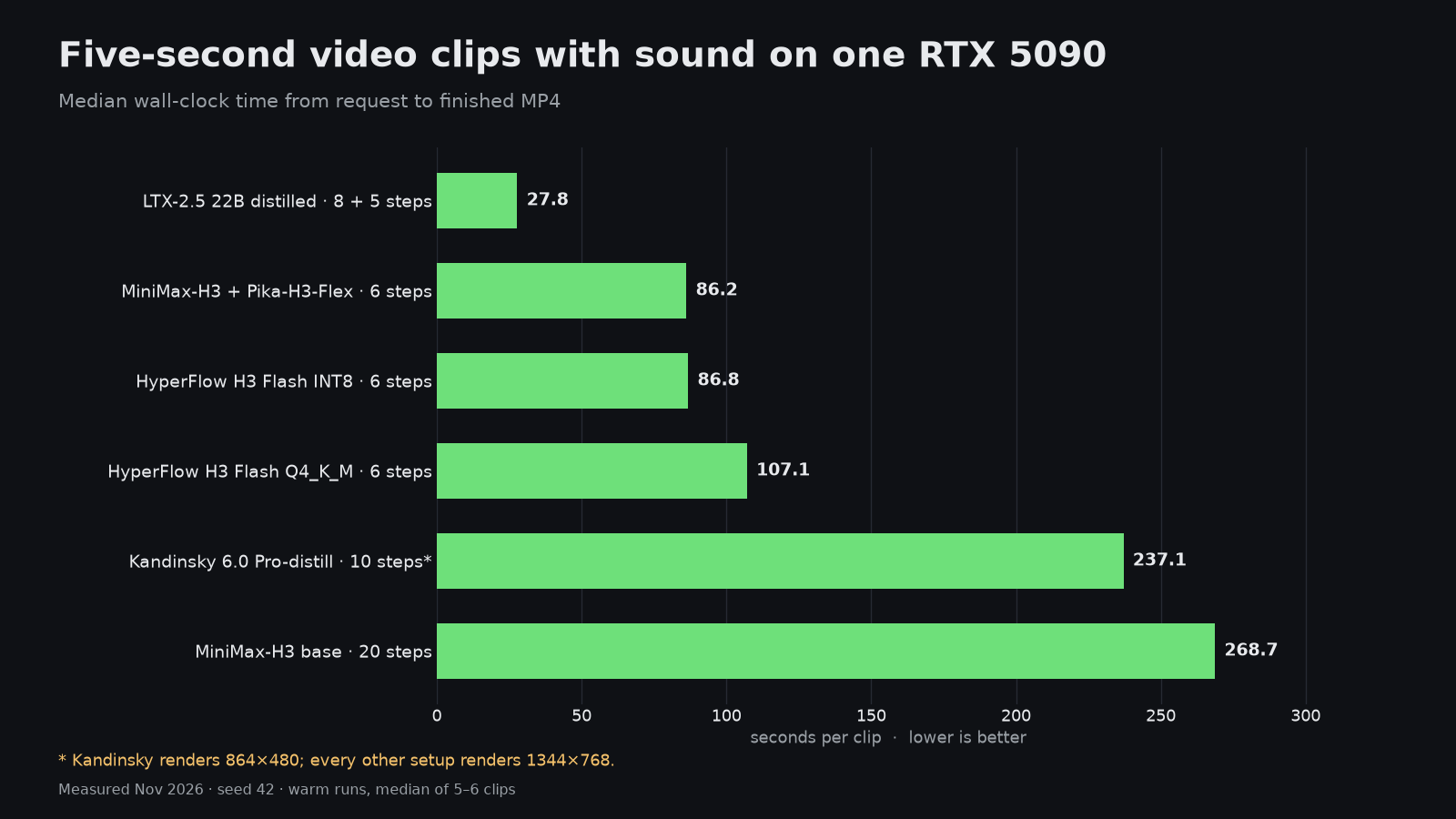
The same card is a serious video box. LTX-2.5 22B distilled finishes a 5-second 1344×768 clip with sound in 27.8 s. MiniMax-H3 with the Pika-H3-Flex distillation takes 86.2 s, HyperFlow H3 Flash INT8 86.8 s, and the 20-step MiniMax-H3 base model 268.7 s. For still images, FLUX Klein needs 1.96 s per picture, Qwen-Image 2.1 7.64 s and MOSS 12.81 s.
Which stack to pick
- One user, chat and coding: TensorFold with DFlash2 at 253.4 tok/s and a 256K context.
- Agents, RAG or several users: NInfer with NVFP4, for 10,628 tok/s prefill and 711.9 tok/s across eight requests.
- Best answers at good speed: Qwentin EXL3 5.75 bpw or ExLlamaV3 4.0 bpw, both near 150 tok/s with the top quality scores.
- Familiar OpenAI-compatible serving with no custom build: vLLM, accepting about 67 tok/s per stream.
- Watch VRAM: four of the five stacks peak above 27 GiB, so leave the desktop on the integrated GPU if you can.